



E-Commerce•11 Min
How Programmatic SEO Delivered 135,000 Organic Clicks and ~830 Ranked Pages Across 5 Client Sites in 16 Months

Written byRishi Thacker
Posted onOct 19, 2026



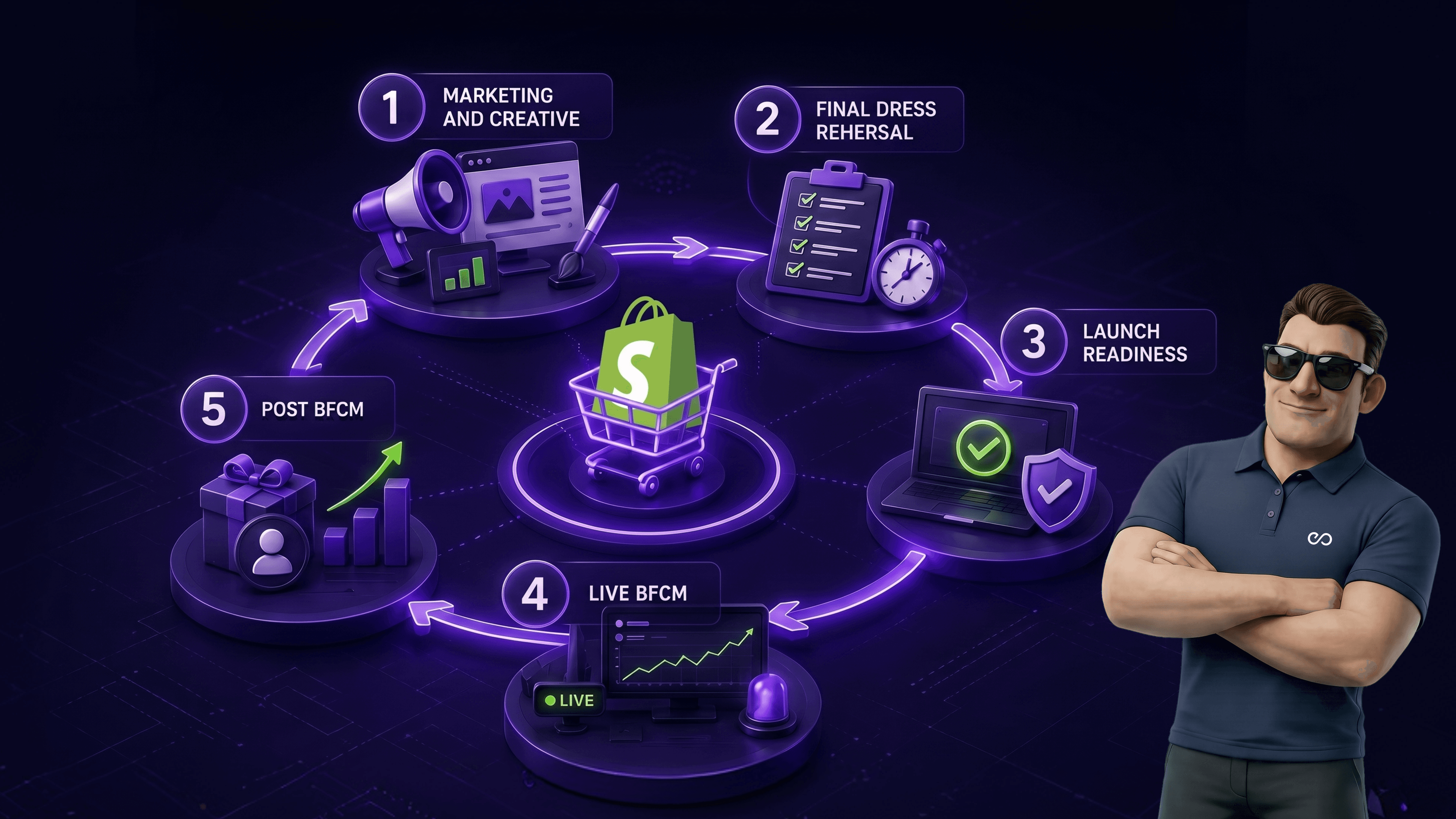
BFCM 2026 prep for Shopify Plus merchants breaks into five phases. T-90 to T-61 covers strategy, inventory forecasting, and goal-setting. T-60 to T-31 handles infrastructure, load testing, and checkout audit. T-30 to T-15 finalizes creative and ad accounts. T-14 to T-8 runs the dress rehearsal. T-7 to T-1 is launch readiness and last-mile fixes. Most stores that miss BFCM revenue targets skipped one of these phases. The biggest single predictor of a successful BFCM is starting prep 90 days out, not 30.
The four-day Black Friday Cyber Monday window in 2024 generated over $11.5 billion in Shopify GMV, a record at the time. BFCM 2025 broke that record again. BFCM 2026 will break it once more.
For Shopify Plus merchants, BFCM isn’t a four-day event. It’s a 90-day prep window that determines whether you scale into a record peak or watch the weekend pass with a checkout that times out at the worst possible hour. In our work preparing Shopify Plus stores for BFCM across the last four years, the pattern is consistent: stores that start 90 days out outperform stores that start 30 days out by 2 to 3 times in BFCM revenue.
This is the checklist we use internally with clients. It covers the five phases from T-90 through launch, plus what to do during the weekend itself and the 30 days after. If you’re a Shopify Plus merchant reading this in late August or early September, you’re roughly on time. If you’re reading it in October, accelerate the early phases and don’t skip them.
Three forces are pulling BFCM 2026 upward at the same time.
The first is structural Shopify growth. Shopify’s Q1 2025 results showed continued growth in GMV and Shopify Plus merchant count, with the Plus tier expanding into new enterprise-grade brands across 2025 and 2026. More Plus merchants means more BFCM volume.
The second is the agentic commerce shift. ChatGPT Instant Checkout launched in late 2025 and integrates directly with Shopify, which is why every Shopify Plus merchant should now have a ChatGPT shopping setup in place before BFCM. A portion of BFCM 2026 buying will happen inside AI assistants rather than on storefronts, and Shopify’s Agentic Storefronts infrastructure determines whether your products surface in those flows.
The third is BNPL maturity. Shopify reported BNPL adoption growth through 2024 and 2025, with Shop Pay Installments (US), Klarna, Clearpay (UK), and Tabby/Tamara (UAE) all driving higher conversion at checkout. The merchants who offer the right BNPL mix for their region capture demand that would otherwise abandon at the price-shock moment.
All three forces compound during the BFCM window. A Shopify Plus store entering BFCM 2026 with checkout reliability, agentic-checkout enablement, and regional BNPL coverage has a structurally better weekend than one without. The checklist below covers all three.
| Phase | Window | Focus | Time investment |
|---|---|---|---|
| Strategic foundation | T-90 to T-61 | Goals, inventory, promo strategy, team alignment | 20-30 hours |
| Infrastructure and audit | T-60 to T-31 | Checkout, load testing, schema, integrations | 40-60 hours |
| Marketing and creative | T-30 to T-15 | Email, SMS, ads, landing pages, segmentation | 60-80 hours |
| Final dress rehearsal | T-14 to T-8 | Soft launch, monitoring, last-mile fixes | 30-40 hours |
| Launch readiness | T-7 to T-1 | Final QA, on-call setup, war-room prep | 20-30 hours |
| Live BFCM | The weekend | Real-time monitoring, rapid response | 60-80 hours (team) |
| Post-BFCM retention | First 30 days after | Subscriber capture, flow activation, attribution | 40-60 hours |
The total team investment for a mid-market Shopify Plus store typically runs 270 to 380 hours across the 90 days. Larger stores invest 500+ hours. Below that range, something gets cut, usually the dress rehearsal, and that’s where revenue gets left on the table.
The strategic foundation phase is the most-skipped and the highest-leverage. Skipping it doesn’t break BFCM directly; it just means every later phase makes decisions without context, and execution drifts.
Set BFCM revenue and unit targets before anything else. Use last year’s BFCM as the baseline. If your store grew 30% YoY in 2025, plan for BFCM to grow at least at the same pace and ideally 1.5x because BFCM amplifies underlying growth.
Document the targets clearly: revenue, units, AOV, conversion rate, and new-customer acquisition count. Share them with the team and treat them as the success criteria for the entire prep effort.
Inventory is the single largest BFCM constraint. The forecast needs to be done now so suppliers and 3PLs have lead time. Three rules from what we’ve seen go wrong most often.
Forecast at the SKU level, not the category level. Aggregate forecasts hide stock-outs on the specific products that drive 80% of BFCM revenue. Build in buffer stock at 1.3x to 1.5x of forecast on hero SKUs. The cost of stock-out during BFCM (lost revenue, lost new-customer LTV) is much higher than the cost of holding excess stock for 60 days. Coordinate with your 3PL or warehouse team on cutoff dates for inbound stock. Most 3PLs lock receiving capacity in mid-October.
Decide which products discount, by how much, and when. The teardrop pattern works for most stores: smaller teasers in the week before BFCM, peak discount Thanksgiving evening through Black Friday, slightly lower discount on Saturday/Sunday, second peak on Cyber Monday.
Avoid the trap of competing on headline discount percentage. In our work with Shopify Plus clients, the brands that win BFCM compete on value perception through smart product bundling, gift with purchase, free shipping thresholds, and loyalty point multipliers rather than racing to the deepest single discount.
BFCM touches operations, customer service, finance, marketing, engineering, and leadership. Schedule the kickoff meeting at T-90 with the actual humans who will own each phase. Document the RACI for: site uptime, checkout reliability, ad spend authorization, customer service capacity, fulfillment SLAs, and post-BFCM email flow activation. Most BFCM problems we see are coordination failures, not technology failures.
The infrastructure phase is where revenue gets won or lost without the team realizing. Sites that survive BFCM did the audit in October. Sites that crashed skipped it.
Run a full checkout audit during this window. Test as a real customer on mobile and desktop. Check every payment method you offer, every shipping zone, every promo code logic combination, and every customer-portal action (login, address update, gift-card redemption, account creation).
Specific checks worth running:
Most Shopify Plus stores don’t load-test, then discover during BFCM that a third-party app or custom theme element doesn’t hold up under burst traffic. Run a load test using k6 or Loader.io against your staging environment, simulating the peak concurrent-visitor count you expect during BFCM. A reasonable target: 5x your highest historical day from the prior year.
Shopify’s core infrastructure will absorb the traffic. What can break is your custom theme JavaScript, third-party widget scripts that fail to load, and apps that hit rate limits on their own backends. This is also where focused Shopify performance optimization work pays off the most: identify and isolate the bottlenecks now, not during the BFCM weekend.
This is where SEO and GEO meet BFCM. Search engines and AI assistants need clean structured data to surface your products correctly during BFCM-related queries. Audit your Product schema, BreadcrumbList schema, Offer schema (including price, availability, priceValidUntil), and FAQPage schema across PDPs and category pages.
If you haven’t reviewed your schema stack in the last six months, this is the window. The same structured-data work that powers GEO foundation for AI visibility on Shopify determines whether your products surface in AI Overviews, ChatGPT product queries, and Perplexity comparison answers during BFCM. Pair the schema audit with a fresh llms.txt file so AI crawlers find your priority pages cleanly.
List every third-party integration touching the storefront, checkout, fulfillment, or customer data. Test each one against your staging environment, looking for breakage. The integrations that typically break under load: subscription apps, loyalty apps, custom shipping rate calculators, and inventory-sync apps connecting to a 3PL or ERP.
For stores running custom checkout logic, this is also the window to confirm any Shopify Scripts have been migrated to Shopify Functions, because Scripts deprecation is now behind us and unmigrated stores risk silent checkout regressions during BFCM.
Sitemap submission to Google Search Console and Bing Webmaster Tools should happen at T-45 so Google has time to recrawl key product pages before BFCM week. Submit landing pages individually using the URL Inspection tool’s “Request Indexing” feature. Build dedicated BFCM landing pages at T-45 so Google indexes them in time.
The marketing phase is where execution velocity matters most. Creative needs to be locked, ad accounts warmed, email flows ready, and segments built before the window closes.
Hero images, lifestyle photography, video assets, email templates, social creative, and landing page copy should all be finalized and approved by T-20. Trying to finalize creative during BFCM week is the most common reason teams burn out before the weekend starts.
For each creative format, build at least three variants so you can rotate creative if early performance disappoints. Static fatigue is real during BFCM week, and a single creative running for four days will underperform a rotation by 15-30% in our experience.
Meta and Google ads accounts need to be warmed before BFCM. That means running at slightly higher spend through the last two weeks of October and the first two weeks of November so the algorithms are familiar with your audience signals at scale.
Cold-starting an ad account on Black Friday morning with 10x your normal daily budget guarantees underperformance for the first 24-48 hours while the algorithm learns. The cost of warming is small compared to the cost of cold-starting at peak. Meta’s ads-manager documentation covers the warming approach in detail.
In Klaviyo (or whichever ESP you use), build at least these segments before BFCM:
Each segment gets a different campaign sequence. The biggest BFCM email mistake we see is sending the same campaigns to all subscribers and letting the email service provider sort it out. This is exactly the level of ecommerce personalization that separates high-performing BFCM programs from default sends, and it pairs with the broader marketing automation layer your store should already be running.
BFCM-specific landing pages convert 25-40% better than sending traffic to general homepage or collection pages, in our experience. Build dedicated landing pages for: the main BFCM hub, the top three product categories, the VIP early access (gated), and the post-Cyber-Monday extension if you’re running one.
Each landing page should include: clear BFCM offer above the fold, urgency signal (countdown timer), social proof (review count or trust signal), top-product carousel, and a clear CTA to either the collection or the top SKU. The Shopify collection page SEO template is the structural pattern we use for BFCM hub pages, because the same six-block layout that ranks for evergreen category queries also converts well for BFCM traffic.
The dress rehearsal week is where the prep gets stress-tested before money is on the line. Skipping this is the most-common BFCM failure pattern across Shopify Plus stores.
Two weeks out, run a soft-launch campaign to a subset of your email list (10-20% of active subscribers). Use real BFCM creative, real promo codes, and the actual checkout flow you’ll run during BFCM. Measure conversion rate, AOV, page load times, and customer service ticket volume.
This soft launch surfaces problems while there’s still time to fix them. We’ve caught broken promo logic, missing payment methods, slow PDP loads, and email rendering issues in dress-rehearsal weeks that would have cost six figures during BFCM weekend.
Customer service volume during BFCM typically runs 3-5x normal. Test that your help-desk software, automated reply flows, and live chat all hold up under simulated load. If you use Gorgias, Zendesk, or a similar platform, run a stress test on macros and tagging logic.
Pre-write the macros for the BFCM-specific questions you’ll get: shipping cutoff dates, promo code troubleshooting, order modification windows, return policy during sale, and stockout messaging. Pre-writing these saves 30-50% of agent time during the weekend.
Coordinate with your 3PL or warehouse team on receiving cutoffs, picking capacity, carrier pickup schedules, and the holiday shipping deadlines. USPS, UPS, and FedEx all publish their last-day-to-ship dates each year. Display these prominently on your site by T-10.
For international shipping, coordinate with your cross-border carrier on customs cutoffs. Post-Brexit EU shipping has tighter cutoffs than most US merchants expect. UAE-based merchants should also factor in the Ramadan timing for the following year, since the Shopify Payments UAE infrastructure that went live in 2026 changes which carriers and BNPL providers you can rely on during peak.
Set up real-time monitoring on every system touching the BFCM weekend. Specific dashboards we recommend:
Designate the team member on call for each alert and the escalation path.
The final week is about freeze, freeze, freeze. No more changes that aren’t critical. Confidence builds through stability.
By T-7, no more theme changes, no more app installations, no more checkout customizations. The only changes that should ship are critical bug fixes, and even those need a structured approval path.
The reason: every change has a small probability of introducing a regression, and the cost of a regression discovered during BFCM weekend is much higher than the cost of waiting until after. Document the freeze policy clearly with the team.
Test the entire purchase flow one more time. Mobile and desktop. All payment methods. Multiple shipping addresses including international. Promo code combinations. Subscription products. Gift cards. Account creation. Login. Password reset. The full set of customer journeys you expect during BFCM.
Document the QA pass with screenshots so the team has a reference for what “working” looks like if something breaks during the weekend.
By T-3, brief every team member who will be working during the BFCM weekend on their role, escalation paths, and the war-room communication channel (typically a dedicated Slack channel). Each on-call team member should know: their hours of coverage, who they escalate to, what’s in scope versus out of scope for the weekend, and the success metrics they’re owning.
Set up a war-room (physical or virtual) that the team can use during peak hours. The war-room dashboard should show: real-time revenue, conversion rate, site response time, ad spend pacing, inventory levels, and customer service ticket queue. This is the single source of truth during the weekend.
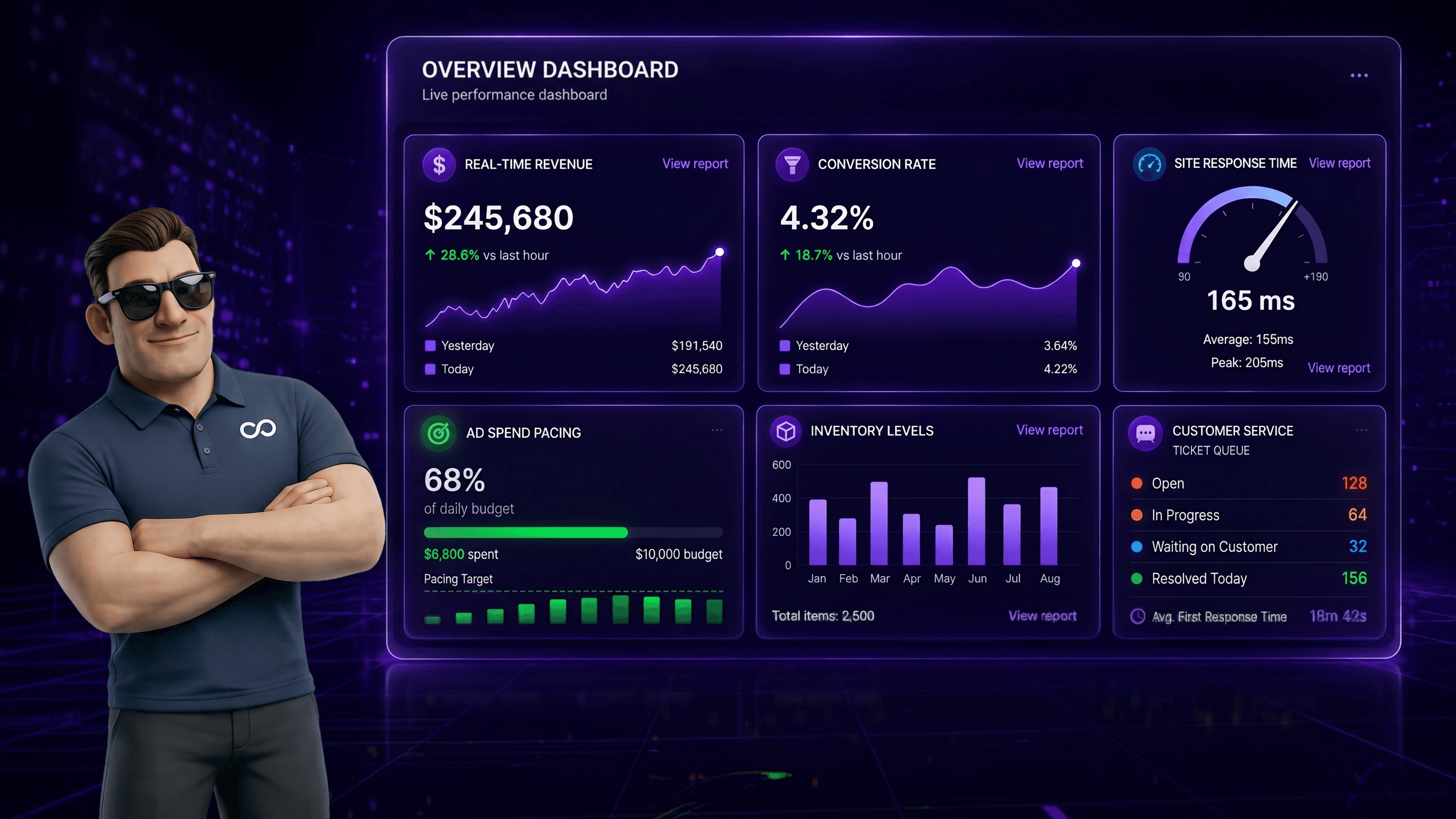
The weekend is execution, not strategy. The strategy decisions all got made earlier. The job during BFCM is to monitor closely and respond fast when something needs intervention.
Five metrics tell you in real time whether BFCM is working:
Revenue per hour against forecast. If you’re behind forecast by 25%+ for two consecutive hours, something is wrong and you need to diagnose. Conversion rate vs your normal baseline. A drop suggests a checkout problem, a creative problem, or a traffic-source mismatch. Site response time, especially under p95 (95th percentile). Spikes here predict checkout failures within minutes. Customer service ticket categories. A surge in a specific ticket type (shipping confusion, payment error, missing promo) tells you exactly what to fix. Inventory burn rate on hero SKUs. If a SKU is selling 3x faster than forecast, swap creative away from it before stock-out costs you the post-stockout traffic.
Most BFCM problems fall into one of four categories: checkout breakage, ad performance drop, customer service overflow, or inventory stockout. For each category, have a pre-defined intervention path with the team member who owns it. Document this before BFCM so nobody is debating ownership at 2am Saturday.
Stay calm. The weekend is long. Sustainable response over four days beats heroic response over the first 24 hours followed by burnout.
The 30 days after BFCM is where the long-term value gets captured. Most stores treat post-BFCM as a recovery window and leave revenue on the table. The brands that win year-over-year treat it as a retention sprint focused on driving repeat purchase.
Every BFCM customer enters a dedicated post-purchase sequence. The sequence should include: thank-you note with order details (transactional, immediate), product education or use-case content (3 days post-purchase), review request (10 days post-delivery), cross-sell or replenishment offer (21 days post-purchase), and welcome-to-VIP if they qualified (30 days post-purchase).
The goal: convert the BFCM transactional purchase into a second purchase within 90 days. In our experience, BFCM customers who make a second purchase within 90 days have 3-5x the LTV of single-purchase BFCM customers.
BFCM customers are a high-intent audience for the holiday gift window that runs from December 1 through December 22. Segment BFCM purchasers separately and run a gift-focused campaign in early December featuring gift bundles, gift cards, and giftable AOV bands. The same Christmas marketing strategies that work for general acquisition convert harder against an audience that just bought from you in November.
BFCM generates massive review opportunity that most stores under-collect. Set up automated review requests through Trustpilot, Judge.me, Yotpo, or your review platform of choice, timed to send 10-14 days post-delivery (long enough for the product to arrive and be used, short enough for the purchase memory to be fresh). A well-tuned BFCM review collection program will increase your review count by 30-50% in the four weeks following the weekend.
Within two weeks of BFCM ending, run a structured postmortem with the team. Document what worked, what didn’t, where revenue was lost, where it was captured, and what to change for BFCM 2027. The postmortem is the single most important asset for compounding year-over-year BFCM performance.
Across the Shopify Plus stores we’ve worked with on BFCM prep, five mistakes repeat year after year. All five are avoidable with planning.
The first is starting prep 30 days out instead of 90 days out. The compressed timeline forces shortcuts in infrastructure, creative, and segmentation. The revenue impact is measurable: 30-day prep stores typically capture 60-70% of the BFCM they could have hit with 90-day prep.
The second is racing to the deepest discount instead of building value perception. Headline-discount competition is a race to the bottom in margin. Bundle offers, free shipping thresholds, loyalty multipliers, and gift-with-purchase all preserve margin while still feeling like a deal.
The third is skipping the dress rehearsal week. The soft launch at T-14 catches the problems that would otherwise show up during the weekend at full traffic. The stores that skip this routinely discover broken promo logic or slow PDP loads on Friday morning when the cost of fixing is highest.
The fourth is under-segmenting email. Sending the same campaign to all subscribers leaves 30-50% of email revenue on the table. The segments listed earlier (active, inactive, past BFCM, VIP, browse abandoners, cart abandoners, subscribers) each respond to different creative and cadence.
The fifth is treating post-BFCM as recovery rather than retention. The 30 days after BFCM is the highest-value retention window of the year. Stores that activate the post-purchase sequence, run the gift-window campaign, and capture the review volume compound BFCM into a 90-day revenue event rather than a four-day spike.
If you’re scoping a BFCM prep program for a Shopify Plus store and want a structured second pair of eyes on the readiness checklist, the platform migration and optimization team at Huptech Web runs these audits between September and November each year.
T-90 from BFCM is roughly the end of August 2026 (BFCM 2026 runs Friday 27 November through Monday 30 November). The strategic foundation phase needs to be in motion by then. Stores starting at T-60 (late September) can still execute, but at compressed quality. Stores starting at T-30 (late October) will leave meaningful revenue uncaptured.
For a mid-market Shopify Plus store, internal team time runs 270 to 380 hours across 90 days, plus ad spend, creative production, and any agency partner fees. Total cost varies enormously by store size, but the rough range we see is $50,000 to $200,000 in prep investment for stores doing $5M to $20M in BFCM revenue. The ROI is typically 10x to 30x on prep cost.
The checkout audit at T-60. A working checkout under load is the single non-negotiable for BFCM. Everything else (creative, segmentation, ads) drives traffic; checkout converts traffic into revenue. If you can only do one thing, audit and load-test the checkout.
Yes, at T-7. The cost of an unplanned regression during BFCM is much higher than the cost of waiting one week to ship a feature. Document the freeze policy and stick to it.
In our experience, yes. BFCM-specific landing pages convert 25-40% better than sending traffic to a general homepage or category page, because the landing page can frame the BFCM offer above the fold and reduce decision friction.
UAE BFCM patterns lean heavier on luxury, beauty, and electronics, with BNPL (Tabby, Tamara) and COD remaining important payment options. The fulfillment cutoff dates differ from US/UK because of the regional carrier mix. The Shopify Payments UAE early-access launch covers the payment infrastructure changes UAE merchants should have configured before BFCM 2026.
Three things. First, agentic commerce: ChatGPT Instant Checkout, Shopify Agentic Storefronts, and similar AI-driven buying flows will capture a measurable share of demand for the first time at meaningful scale during BFCM 2026, and stores need a ChatGPT shopping guide setup in place. Second, BNPL maturity: regional BNPL coverage (Shop Pay Installments US, Klarna UK, Tabby/Tamara UAE) is now table stakes for AOV-sensitive categories. Third, AI search discovery: ChatGPT, Perplexity, Gemini, and Google AI Overviews increasingly determine which brands surface for BFCM-related queries, which makes GEO foundation work a prerequisite, not a nice-to-have.
Checkout Extensibility, Shopify Functions (which replaced Shopify Scripts), Shop Pay, Markets for multi-region storefronts, and the launch-mode infrastructure built into Shopify Plus. The full Shopify features list relevant for BFCM sale covers the merchant-side configuration of each.
The Shopify Plus stores that win BFCM 2026 will be the ones that started prep in late August. The ones that scale to record revenue will be the ones that ran the dress rehearsal, treated infrastructure as non-negotiable, and built the post-BFCM retention sprint as carefully as the BFCM weekend itself.
BFCM isn’t a four-day event. It’s a 90-day operation that produces a four-day result and a 30-day retention follow-through. The checklist above is what we use internally with clients. Adapt it to your store size, your category, and your team capacity, but don’t skip the phases.
If you’re a Shopify Plus merchant scoping your BFCM 2026 prep and want a structured external review of your readiness, the Huptech Web Shopify Plus team runs readiness audits between August and November each year. We’ve prepared 40+ Shopify Plus stores for BFCM across the last four years and can typically identify the three to five highest-leverage gaps in a half-day review.


Drop your details and we'll email the download link straight to your inbox.