


E-Commerce•8 Min
How This Shopify Store Made $200K From Web Push Alone in 80 Days With PushOwl

Written byRishi Thacker
Posted onOct 02, 2026



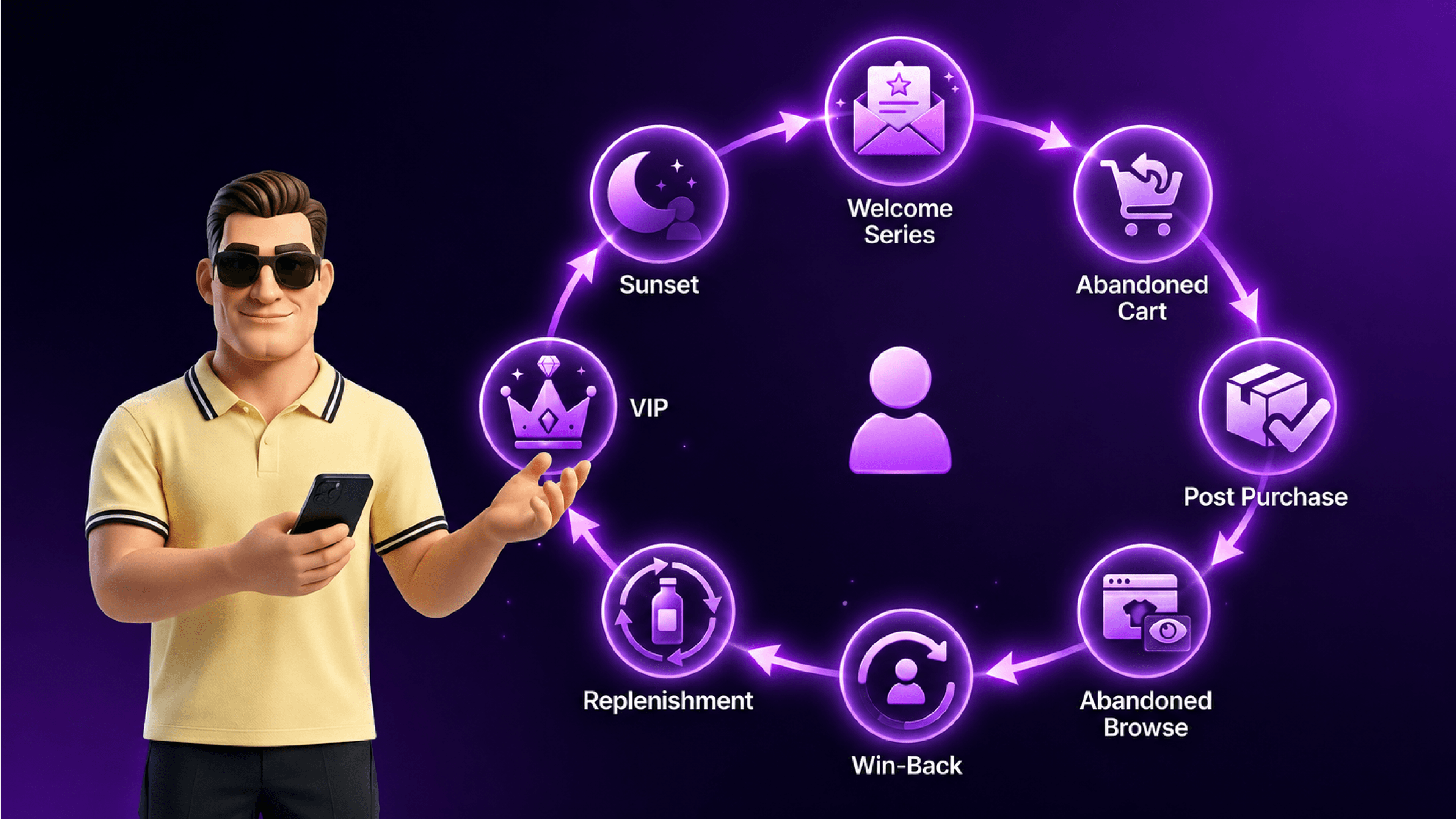
Most Shopify stores running Klaviyo activate the default welcome and abandoned cart flows, then stop. The eight flows that actually drive retention revenue are: welcome series, abandoned browse, abandoned cart, post-purchase, win-back, VIP, replenishment, and sunset. Together they typically generate 30-40% of total email revenue, with abandoned cart and welcome contributing the largest single shares. The biggest mistake we see is treating flows as set-and-forget rather than testing creative, timing, and conditional logic every quarter.
Klaviyo is the email and SMS platform that powers retention for most of the Shopify Plus stores we work with. It’s also the platform that most stores use at maybe 30-40% of its real capability. The flows ship with templates, the templates feel ready to use, the team activates them, and then the platform sits at default settings for years while the retention revenue it could be generating leaks out quietly.
This is the template set we install on every Shopify Plus store. Eight flows, each with the trigger, the sequence structure, the segmentation logic, and the common mistake we see most often. The conversion ranges come from a combination of Klaviyo’s published benchmarks, Shopify retention data, and our direct experience across 50+ Klaviyo installations between 2022 and 2026. Use the flows as templates, then adapt to your category and audience.
If you’re a Shopify Plus merchant about to enable Klaviyo, or running it on defaults and wondering where the revenue is, this is the starting point.
Three patterns repeat across every Klaviyo audit we run.
The first is unsegmented sends. The default welcome and abandoned cart flows fire the same email to every subscriber regardless of behavior, purchase history, AOV, or category interest. A VIP customer who has bought four times gets the same generic abandoned cart email as a brand-new browser. That misses the point of having a behavioral platform, and the answer is the ecommerce personalization approach that Klaviyo was built to enable.
The second is the missing flows. Most stores activate welcome and abandoned cart, then stop. The other six flows in this list (browse, post-purchase, win-back, VIP, replenishment, sunset) typically contribute another 15-25% of email revenue when properly set up. Without them, the retention engine runs on two of eight cylinders.
The third is creative fatigue. Flows get built once, then run for two years without refresh. Klaviyo’s own data on creative testing shows that flows refreshed quarterly outperform set-and-forget flows by 20-30% in revenue per recipient. Most stores skip the refresh because nobody owns it.
The fix on all three is structural: build the full eight-flow stack, segment behaviorally, refresh creative quarterly. The templates below are the starting point.
Build them in this order if you’re starting from scratch:
| Priority | Flow | Why this priority | Typical revenue contribution |
|---|---|---|---|
| 1 | Welcome Series | Captures first-time visitor email and converts to first purchase | 8-15% of email revenue |
| 2 | Abandoned Cart | Recovers high-intent buyers who left at the last step | 10-20% of email revenue |
| 3 | Post-Purchase | Drives repeat purchase from new customers | 5-12% of email revenue |
| 4 | Abandoned Browse | Catches mid-funnel browsers before they leave | 3-8% of email revenue |
| 5 | Win-Back | Reactivates lapsed customers (highest-value opportunity) | 3-7% of email revenue |
| 6 | Replenishment | Drives reorder of consumable products | 2-10% of email revenue (category-dependent) |
| 7 | VIP | Recognizes and retains top-spend customers | 2-5% of email revenue |
| 8 | Sunset | Removes disengaged subscribers to protect deliverability | Indirect: protects all other flow performance |
Together these eight flows typically generate 30-40% of total email revenue for a well-tuned Shopify Plus store. Below that range, one or more flows are either missing or running on defaults.
The welcome series is the single highest-leverage flow in Klaviyo. It fires when someone joins your list (popup signup, footer signup, checkout signup, etc.) and runs for the first 14 days of the customer relationship. It also typically captures the first purchase from the majority of converted subscribers.
Trigger: New subscriber to your main email list, with a 1-hour delay to allow for double opt-in confirmation.
Sequence structure (7 emails over 14 days):
Conditional splits worth adding:
Conversion benchmarks:
Common mistake we see: Stores send 1-2 welcome emails and stop. The 14-day window matters because most first-time buyers convert in the second week, not the first day. Cutting the sequence short forfeits the largest share of welcome conversions.
The abandoned browse flow fires when someone views a product page but doesn’t add to cart. It’s the highest-volume flow in the stack (most browsers leave without adding) and the most-skipped because it requires Klaviyo’s Web Tracking to be installed correctly.
Trigger: Viewed Product event with no Add to Cart in the next 4 hours.
Sequence structure (3 emails over 5 days):
Conditional splits worth adding:
Conversion benchmarks:
Common mistake we see: Sending the same generic email to all browsers regardless of what they viewed. Dynamic product blocks (pulling in the actual product viewed) lift conversion 2-3x compared to a generic “you were just here” email. The Klaviyo Web Tracking snippet must be installed via the Klaviyo Shopify integration for the dynamic blocks to populate correctly.
The abandoned cart flow is the highest-revenue flow in most Klaviyo accounts. The shopper added to cart, so intent is clear; they just didn’t complete checkout. The sequence’s job is to remove friction.
Trigger: Checkout Started event (Klaviyo’s checkout event) with no Placed Order in the next 1 hour.
Sequence structure (3 emails over 24 hours):
Conditional splits worth adding:
Conversion benchmarks:
Common mistake we see: Discount-first in Email 1. Sending a discount in the first email trains shoppers to abandon cart on purpose to wait for the discount. The right pattern is reminder first, friction-removal second, discount last. We’ve measured this across multiple installations: discount-last sequences earn 30-40% more revenue per recipient than discount-first sequences.
The post-purchase flow runs after the first order completes. Its job is to turn a one-time buyer into a second-time buyer within 90 days, because second-purchase customers have 3-5x the LTV of single-purchase customers. The same dynamic is the core argument behind driving repeat purchase as a retention strategy, and post-purchase is the flow that operationalizes it.
Trigger: Placed Order event (with optional condition: first-time customer only for some emails).
Sequence structure (6 emails over 60 days):
Conditional splits worth adding:
Conversion benchmarks:
Common mistake we see: Treating post-purchase as transactional only (just confirmation and shipping). The retention revenue is in the second half of the sequence (education, review, cross-sell, loyalty). Stores that skip the Day 10+ emails are leaving the biggest LTV uplift on the table.
The win-back flow targets customers who used to buy but haven’t in a defined inactivity window (typically 90-180 days for fashion, 60-90 days for consumables, 12-24 months for high-AOV durables). It’s lower volume than the other flows but has high marginal value because reactivating an existing customer is cheaper than acquiring a new one.
Trigger: Last Placed Order more than [X days] ago, where X is category-specific.
Sequence structure (4 emails over 21 days):
Conditional splits worth adding:
Conversion benchmarks:
Common mistake we see: Treating win-back as just another discount email. The “we miss you” email without a discount actually outperforms an immediate-discount email in reactivation rate, because it positions the brand around the relationship rather than the price.
The VIP flow targets your top-spend customers. Definition varies by category, but typically it’s the top 5-10% of customers by lifetime spend, or customers with 4+ orders, or customers above a category-specific AOV threshold. The flow’s job is recognition, retention, and increasing share-of-wallet, not new acquisition.
Trigger: Customer enters VIP segment (definition based on LTV threshold, order count, or both).
Sequence structure (3 emails over 30 days, then maintenance):
Conditional splits worth adding:
Conversion benchmarks:
Common mistake we see: Treating the VIP flow as a discount channel. VIP customers don’t need discounts; they need recognition. A VIP flow that pushes discounts erodes margin without building loyalty. The right pattern is exclusivity, early access, and signals that the brand sees them.
The replenishment flow is category-dependent. It works brilliantly for consumables (coffee, supplements, beauty, personal care, pet food) and has limited value for durables. The trigger is the expected reorder window, calculated from typical consumption rate.
Trigger: Days since last Placed Order equals [replenishment window in days for the SKU or category].
Sequence structure (3 emails over 14 days):
Conditional splits worth adding:
Conversion benchmarks:
Common mistake we see: Setting a single replenishment window across the whole catalog regardless of product. A 30-day coffee subscription product and a 90-day skincare product need different replenishment timing. Either set per-product timing or skip the flow for the catalog segments where it doesn’t fit.
The sunset flow is the least glamorous and most important flow in the stack. Its job is to remove disengaged subscribers from your active list so deliverability stays strong across all other flows. Email service providers (Gmail, Outlook, Apple Mail) penalize senders whose lists have high inactive rates, which causes other flows to land in spam.
Trigger: Subscriber has not opened or clicked in [X] days, where X is typically 180-365 depending on your normal cadence.
Sequence structure (2 emails over 14 days, then suppression):
Conditional splits worth adding:
Conversion benchmarks:
Common mistake we see: Skipping sunset entirely. Stores that never suppress subscribers eventually trigger deliverability problems, where their active subscriber emails start landing in spam. The sunset flow protects the entire email program, even though its own conversion numbers look unimpressive in isolation.
If you’re starting from scratch, build in this order:
Welcome and Abandoned Cart together (Week 1). These two flows generate the largest share of total flow revenue. Without them, every other flow underperforms because subscribers and abandoners are slipping through.
Post-Purchase (Week 2). This is the second-purchase machine. Without it, you’re acquiring customers and then waiting passively for them to come back on their own.
Abandoned Browse (Week 3). Requires Klaviyo Web Tracking installed first. Once that’s running, the flow itself is straightforward to set up.
Win-Back (Week 4). Lower priority than the first four because it depends on having a meaningful base of lapsed customers, which most newer stores don’t yet. Build it when you have at least 1,000 customers in the lapsed segment.
Replenishment (Week 5, if your category supports it). Only worth the setup time if you sell consumable or replenishable products with a clear reorder cycle.
VIP (Week 6). Highest-leverage per email sent, but lowest volume. Build once you have a meaningful VIP segment (typically 500+ customers at the VIP tier).
Sunset (Week 7). Critical for long-term deliverability, but lowest immediate revenue impact. Build it before deliverability starts degrading, not after.
Five mistakes repeat across Klaviyo audits, regardless of which specific flows are built.
The first is sending the same campaign creative to all subscribers. Default flows don’t segment by behavior, AOV, category, or lifecycle stage. Building segmentation into each flow lifts revenue per recipient 30-50% in our experience.
The second is treating flows as set-and-forget. Klaviyo flows need quarterly creative refreshes. Subject lines fatigue. Images go stale. Copy that worked last quarter underperforms this quarter. Schedule a quarterly flow review on the team calendar.
The third is no SMS layer. SMS in Klaviyo typically converts 3-5x better than email on transactional triggers (abandoned cart, post-purchase, restock). The setup is non-trivial because of consent requirements (TCPA in the US, UK GDPR in the UK), but the conversion uplift makes it worth the work.
The fourth is broken Klaviyo-Shopify data sync. If product images don’t pull through, dynamic blocks don’t render, or events don’t fire, the whole flow stack degrades. Run a sync health check monthly using Klaviyo’s Shopify integration diagnostics.
The fifth is no attribution review. Klaviyo’s revenue attribution defaults to a 5-day window on email and 1-day on SMS. If your sales cycle is longer (typical in B2B or high-AOV DTC), the default window under-attributes flow revenue and makes flows look weaker than they are. Adjust the attribution window to match your category’s actual conversion timing.
For Shopify Plus merchants scoping a Klaviyo audit, the Huptech Web marketing automation team runs flow performance reviews as part of broader retention engagements.
For most Shopify Plus stores, the eight flows in this guide cover the full retention stack. Beyond those, you can add category-specific flows (back-in-stock, low-inventory, price-drop) as needed. More than 12-15 flows total typically means redundancy. Audit and consolidate rather than adding more.
SMS earns its setup cost when transactional triggers have high time-sensitivity. Abandoned cart, back-in-stock alerts, shipping notifications, and post-purchase confirmations all convert better with SMS layered on email. Brand promotional campaigns and welcome series often work better as email-only. The exception is the welcome SMS, which can drive a measurable conversion lift when paired with email.
In our experience, well-tuned flows generate 30-40% of total email revenue, with the remaining 60-70% coming from campaigns and broadcasts. Stores running the full eight-flow stack with proper segmentation typically hit 35-45% from flows. Stores running only welcome and abandoned cart on defaults hit 15-25%.
Quarterly minimum. Subject lines and hero creative typically need refresh every 90 days because performance degrades from fatigue. Segment definitions and conditional logic should be reviewed every six months because audience behavior shifts. Annual rebuilds work for the smallest stores; quarterly works for everyone else.
Klaviyo works globally and handles UK GDPR consent flows cleanly. For UAE stores, Klaviyo supports Arabic content and AED currency display when configured correctly. The platform integrates with Shopify Markets so multi-region Shopify Plus stores can run regionally segmented flows from a single Klaviyo account, which works well alongside the Shopify Payments UAE infrastructure for UAE-targeted segments.
B2B flows lean less on discount mechanics and more on relationship-building. Welcome emails feature account manager introduction. Abandoned cart sequences offer “talk to a rep” alternatives. Post-purchase sequences include reorder logistics and Net 30 / Net 60 payment confirmation. Win-back targets accounts with personalised outreach rather than generic discounts.
Klaviyo was built ecommerce-first with deep Shopify integration. Mailchimp is more general-purpose. Klaviyo’s flow logic, segmentation depth, and revenue attribution are stronger for ecommerce. Mailchimp’s interface is friendlier for non-technical teams. For Shopify Plus stores past $250K annual revenue, Klaviyo’s stronger flow architecture typically justifies the higher price point.
No. Use the same Klaviyo account but build BFCM-specific segments and campaign sequences. BFCM flow modifications include upgraded creative, tighter sending cadence, and time-sensitive subject lines. The Shopify features for BFCM sale covers the merchant-side configuration that pairs with the BFCM-tuned Klaviyo flows, and the Christmas marketing strategies post handles the extended December gift window that follows BFCM.
Email campaigns generate one-time revenue spikes. Flows generate recurring retention revenue every day, on autopilot, indefinitely. The math heavily favors flows over the long run, which is why most retention-mature Shopify Plus stores derive 30-40% of email revenue from flows and only 60-70% from campaigns.
The eight flows in this guide are the template stack we install on every Shopify Plus store we work with. Welcome, abandoned cart, post-purchase, abandoned browse, win-back, replenishment, VIP, and sunset. Build them in priority order, segment behaviorally, refresh creative quarterly, and audit deliverability every six months.
If you’re a Shopify Plus merchant scoping a Klaviyo build-out or want a structured audit of your current flow performance, the Huptech Web marketing automation team runs these reviews regularly. We can typically identify the three to five highest-leverage gaps in a half-day review and recommend the build sequence to close them.

Drop your details and we'll email the download link straight to your inbox.